
Eurotronic
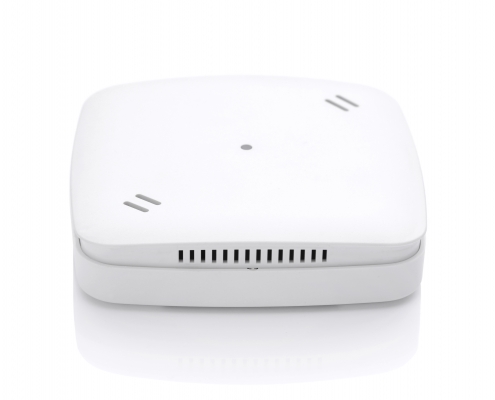
Air Quality Sensor Z-Wave Plus
SKU: EURE700088


Quickstart
This is a
2. Start inclusion mode of your primary Z-Wave Controller.
3.Press the network button three times within 1 second.
4. While the inclusion is active, the LED is blinking green.
Important safety information
Please read this manual carefully. Failure to follow the recommendations in this manual may be dangerous or may violate the law. The manufacturer, importer, distributor and seller shall not be liable for any loss or damage resulting from failure to comply with the instructions in this manual or any other material. Use this equipment only for its intended purpose. Follow the disposal instructions. Do not dispose of electronic equipment or batteries in a fire or near open heat sources.Product Description
The brand new Z-Wave sensor in an ultra slim design housing provides comprehensive information on indoor air quality. Based on these information it is possible to always ensure a healthy living climate.
- CO2 value (as CO2 equivalent) in ppm
- Temperature (°C) and humidity (%)
- Dew point (°C)
Installation
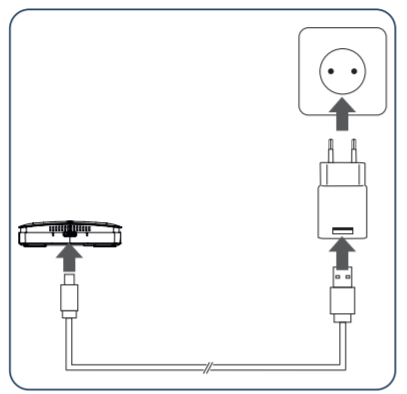
Connect the Micro-USB cable to a AC adapter and to the air quality sensor and afterwards to a power outlet. 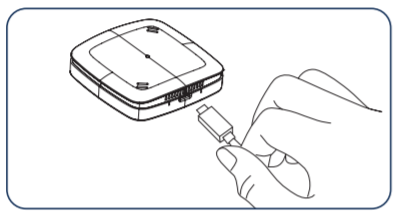
Product Usage
LEDs
Troubleshooting:
red LED lights constantly for 5 seconds
| Reset to factory default | Press and hold the network button for at least 10 seconds. The Air Quality Sensor Z-Wave Plus will indicate the reset blinking pattern once the reset is completed. |
| Inclusion | Press the network button three times within 1 second. |
| Exclusion | Press the network button three times within 1 second. |
| NIF | XXXNIF |
| Wakeup | XXXWakeupDescription |
| Protection | XXXProtection |
| FirmwareUpdate | XXXFirmwareUpdate |
| SetAssociation | XXXSetAssociation |
Association Groups:
| Group Number | Maximum Nodes | Description |
|---|---|---|
| 1 | 5 | Lifeline |
| 2 | 5 | Air - Temperature |
Configuration Parameters
Parameter 1: Temperature on Change Reporting
Size: 1 Byte, Default Value: 5
| Setting | Description |
|---|---|
| 0 | No on change reporting (only time-based reports) |
| 1 - 50 | Report if temperature changed by delta = 0,1°C - 5,0°C |
Parameter 2: Humidity on Change Reporting
Size: 1 Byte, Default Value: 5
| Setting | Description |
|---|---|
| 0 | No on change reporting (only time-based reports) |
| 1 - 10 | Report if humidity changed by delta = 1% 10% |
Parameter 3: Unit Temperature
Size: 1 Byte, Default Value: 0
| Setting | Description |
|---|---|
| 0 | Celsius |
| 1 | Fahrenheit |
Parameter 4: Resolution Temperature
Size: 1 Byte, Default Value: 1
| Setting | Description |
|---|---|
| 0 | No resolution (example 22°C) |
| 1 | Resolution (example 22.3°C) |
| 2 | 1/100 resolution (example 22.35°C) |
Parameter 5: Resolution Humidity
Size: 1 Byte, Default Value: 0
| Setting | Description |
|---|---|
| 0 | No resolution (example 33%) |
| 1 | 1/10 resolution (example 33.4%) |
| 2 | 1/100 resolution (example 33.45%) |
Parameter 6: VOC-on Change Reporting
Size: 1 Byte, Default Value: 5
| Setting | Description |
|---|---|
| 0 | No on change reporting (only time-based reports) |
| 1 - 10 | Report if VOC reading changed by 100ppb - 1000ppb |
Parameter 7: CO2eq on Change Reporting
Size: 1 Byte, Default Value: 5
| Setting | Description |
|---|---|
| 0 | No on change reporting (only time-based reports) |
| 1 - 10 | Report if CO2eq reading changed by 100ppm - 1000ppm |
Parameter 8: Air quality indication via LED
Size: 1 Byte, Default Value: 1
| Setting | Description |
|---|---|
| 0 | No air quality indication via LEDs |
| 1 | Indicate measured air quality via LEDs |
Technical Data
| Dimensions | 68 x 68 x 17 mm mm |
| Weight | 47 gr |
| Hardware Platform | ZM5101 |
| EAN | 4260012711264 |
| IP Class | IP 20 |
| Voltage | 5V |
| Device Type | Routing Multilevel Sensor |
| Generic Device Class | Multilevel Sensor |
| Specific Device Class | Routing Multilevel Sensor |
| Firmware Version | 00.01 |
| Z-Wave Version | 05.03 |
| Z-Wave Product Id | 0148.0005.0001 |
| Frequency | Europe - 868,4 Mhz |
| Maximum transmission power | 5 mW |