
Popp
Z-Wave Outdoor Weather Station
SKU: POPE700786


Quickstart
This is a
Important safety information
Please read this manual carefully. Failure to follow the recommendations in this manual may be dangerous or may violate the law. The manufacturer, importer, distributor and seller shall not be liable for any loss or damage resulting from failure to comply with the instructions in this manual or any other material. Use this equipment only for its intended purpose. Follow the disposal instructions. Do not dispose of electronic equipment or batteries in a fire or near open heat sources.Product Description
The Z-Wave Outdoor Weatherstation measures the intensity of illumination from three directions, wind speed, the outside temperature and the rain status and transfers the values to a Z-Wave controller. The device is powered by 230 V mains power and will act as a z-Wave repeater if needed. The device can control other Z-Wave devices when certain user defined threshold values such as ‘temperature undershooding/overshooting‘, ‘Rain detected‘ or ‘light level‘ are met. This function will work without having a central controller involved.
Installation
Select an assembly location at the building where sun and wind may be collected by the sensors unobstructedly. The sensor may not be shaded by the building or for example by trees. At least 60 cm of clearance must be left all round the device. This facilitates correct wind speed measurement without eddies. The distance concurrently prevents spray (raindrops hitting the device) or snow (snow penetration) from impairing the measurement. It also does not allow birds to bite it.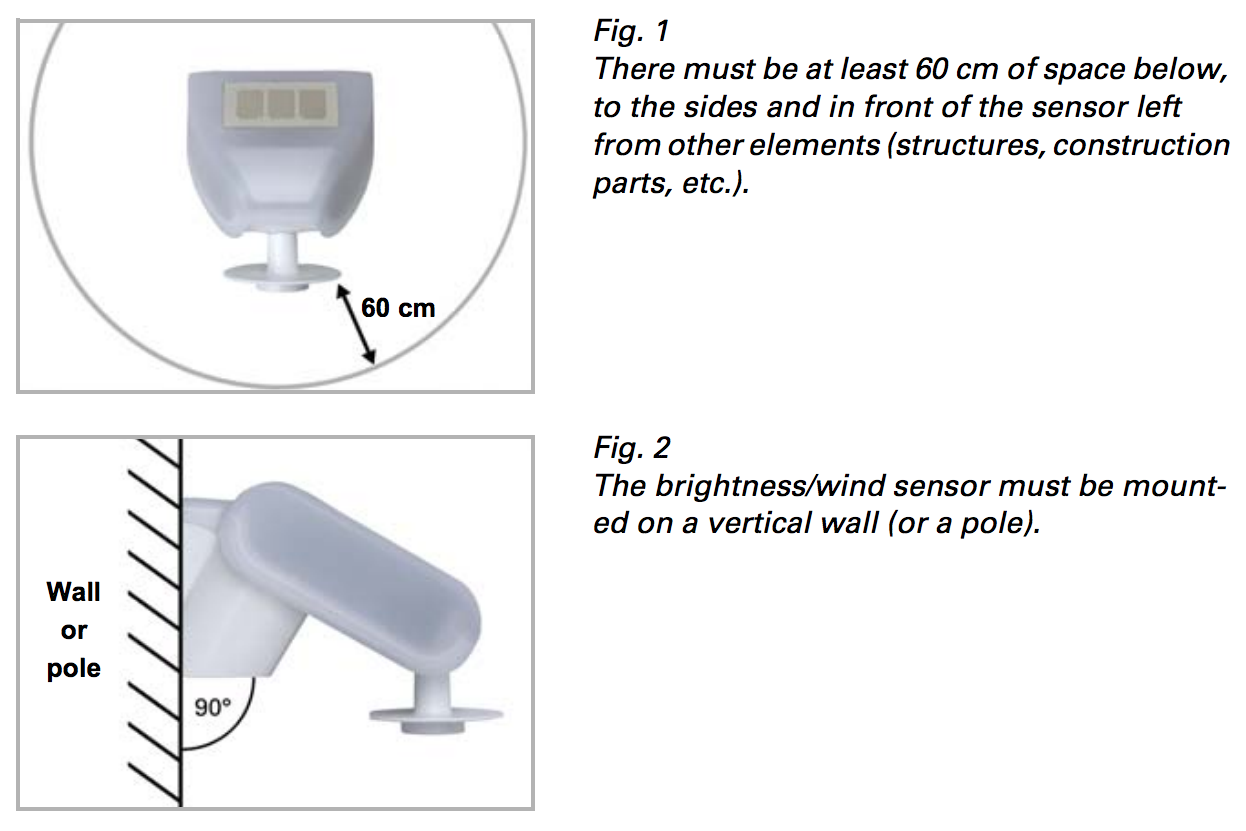
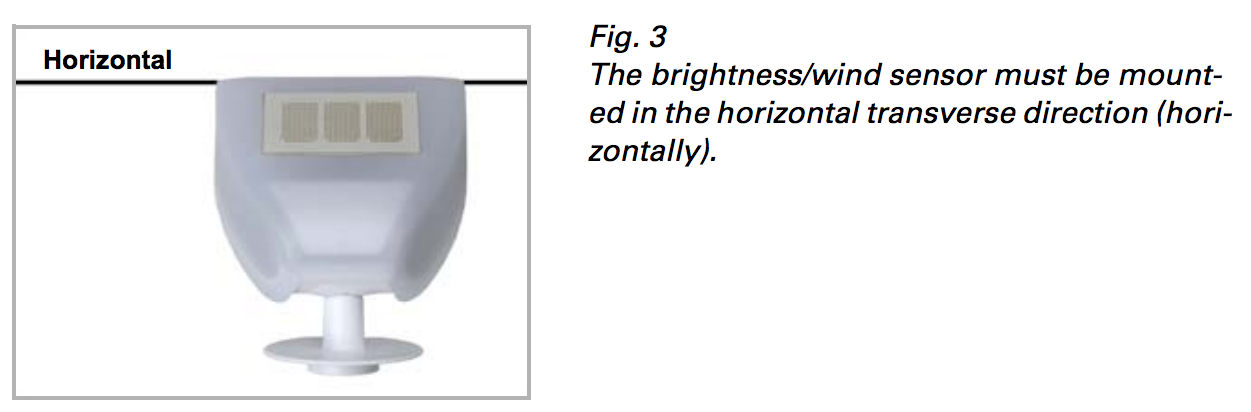
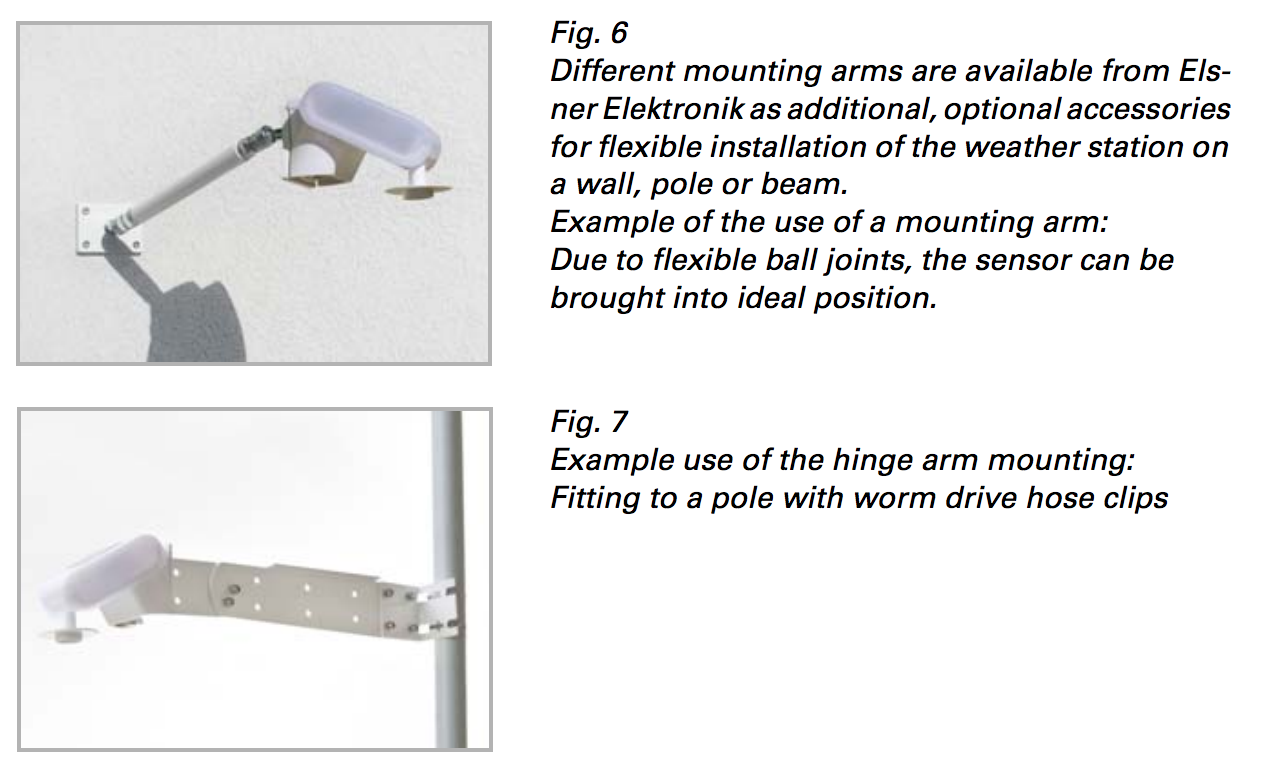
The sensor comes with a combination wall/pole mount. The mount comes adhered by adhesive strips to the rear side of the housing. Fasten the mount vertically onto the wall or pole. 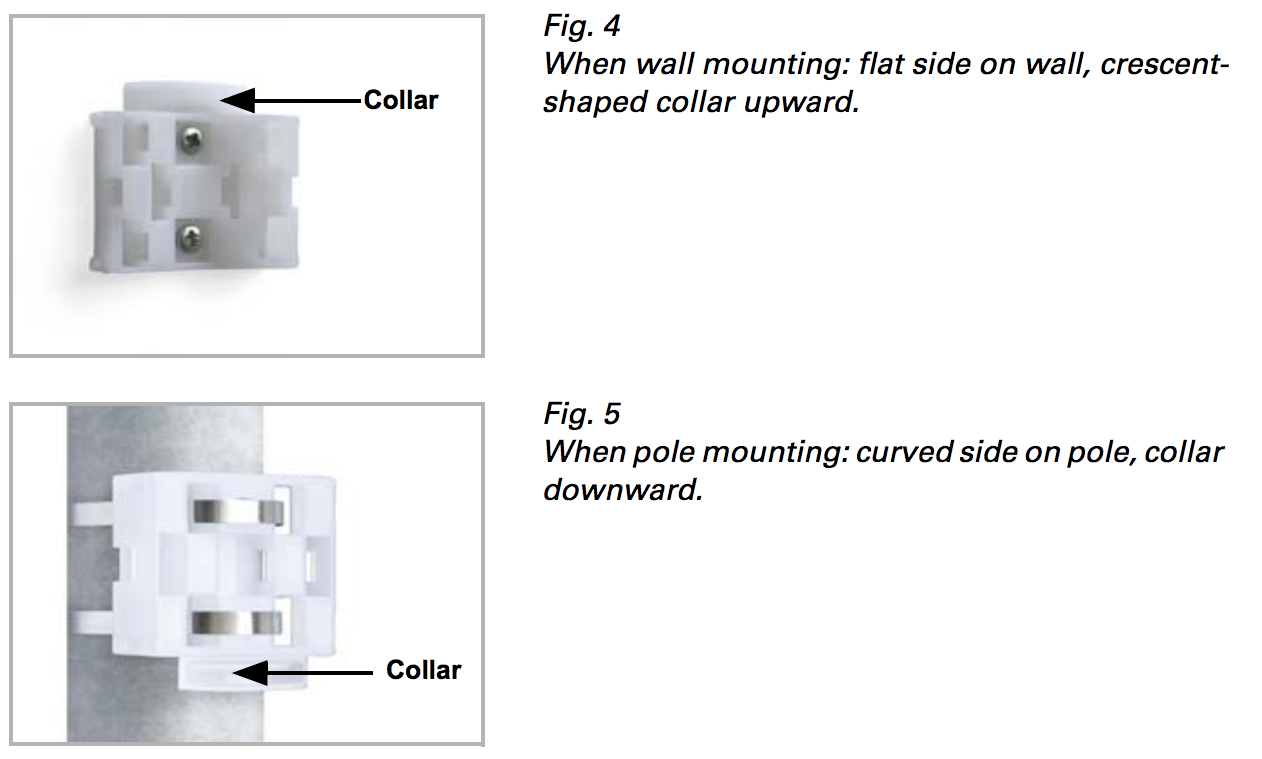
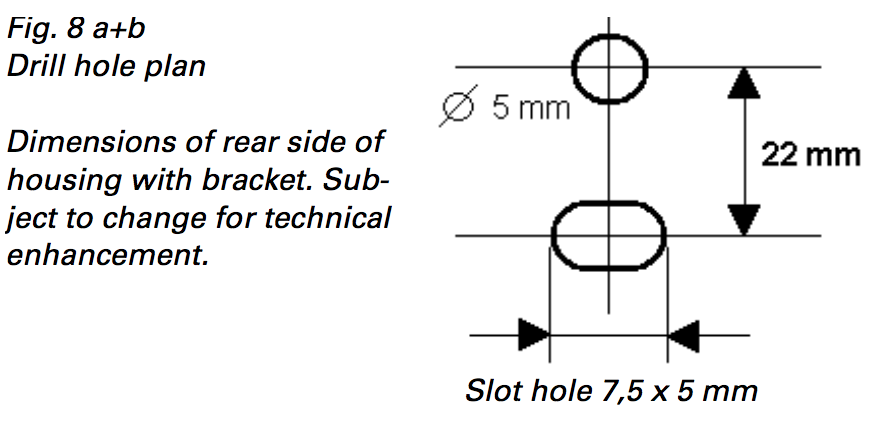
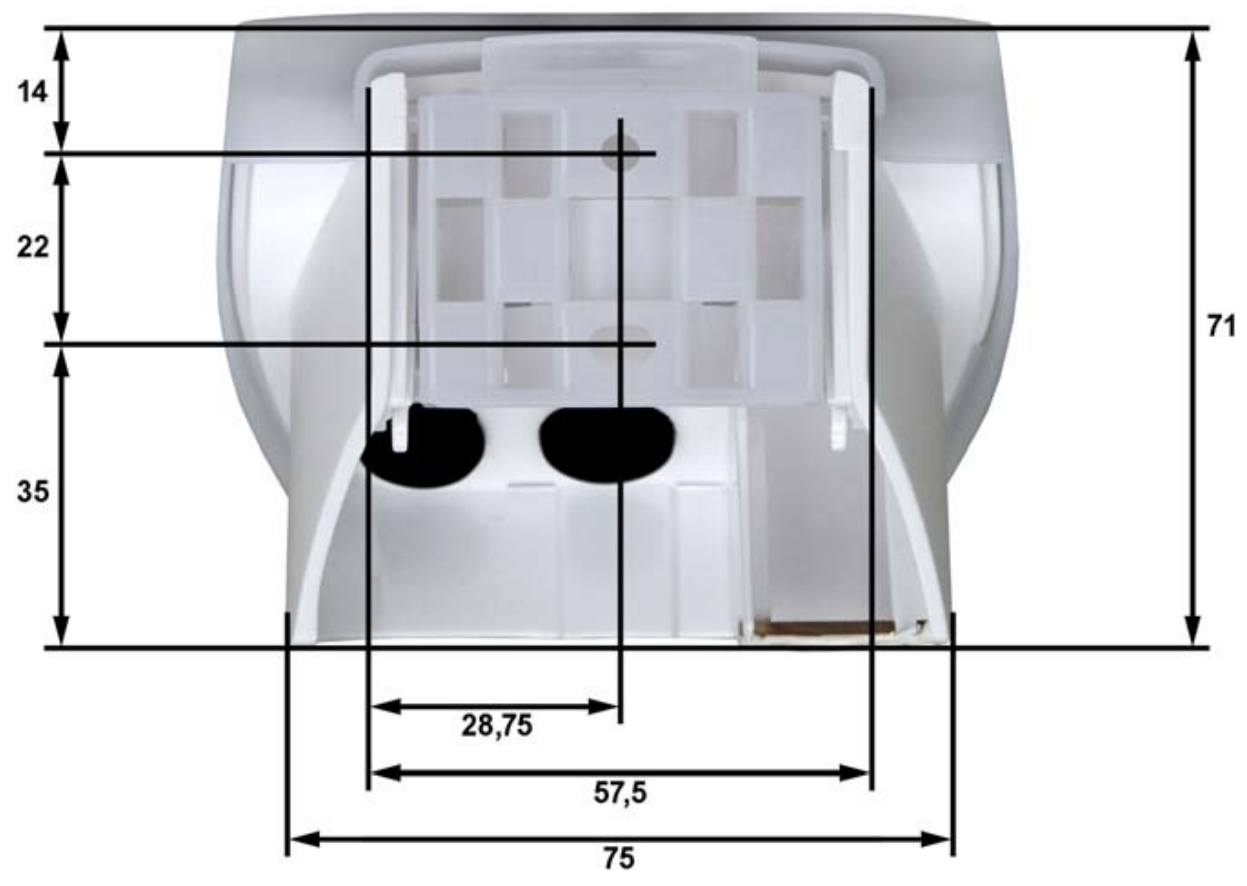
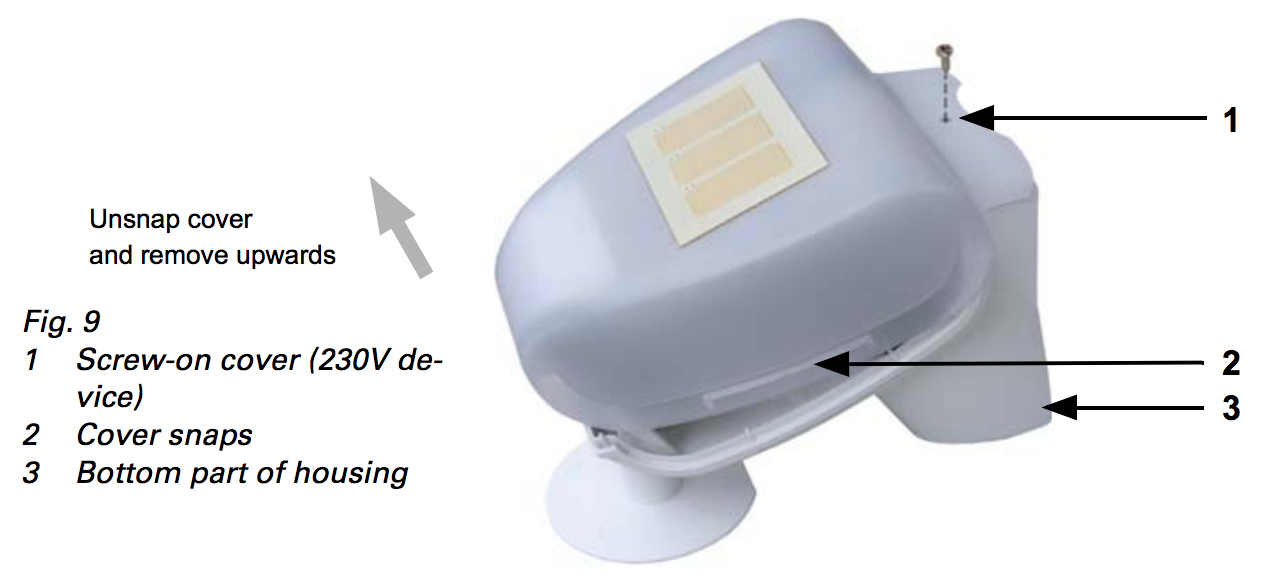
The sensor cover snaps in on the left and right along the bottom edge (see Fig. 9). Remove the cover. Proceed carefully, so as not to pull off the wire connecting the PCB in the bottom part with the cover.
Connect the two wires (N and L) of the 230 V power supply with the green terminals. Make sure the 230 V mains feed comes into the enclosure using the rubber gasket.
Some further notes on installation:
1. Do not open the device if water (rain) might ingress: even some drops might damage the electronic system.
2. Observe the correct connections. Incorrect connections may destroy the sensor or connected electronic devices.
3. The measured wind value and thus all other wind switching outputs may only be supplied 60 seconds after the supply voltage has been connected. After the auxiliary voltage has been applied, the device will enter an initialisation phase lasting a few seconds. During this phase no information can be received or sent wirelessly
Product Usage
Once the device is installed its possible to call measured values from the device and let the device control other devices directly using association groups. The sensor of the device offer the following accuracy:
- Wind: Resolution 0.2 m/s between 0...35 m/s, ±22% of the measurement value when incident flow is from 45…315° ±15% of the measurement value when incident flow is from 90…270° (Frontal incident flow corresponds to 180°)
- Brightness: ±35% between 0...150.000 lux, Resulution: 1 lux at 0…120 lux 2 lux at 121…1.046 lux 63 lux at 1.047…52.363 lux 423 lux at 52.364…150.000 lux
- Temperature: -40…+80°C Resolution, 0.1°C Accuracy ±1°C at -10…+85°C ±1.5°C at -25…+150°C
The device will issue the following Z-Wave notifications:
- Heat overshoot
- Rain
- Wind overshoot
| Reset to factory default | Keep the magnet button pushed for 10 seconds. |
| Inclusion | Triple click of the magnet button. The magnet button is moving the supplied magnet towards the tip of the device and remove it fast. To force unsecure inclusion please keep the magnet button pushed for 2 seconds. |
| Exclusion | Triple click of the magnet button. The magnet button is moving the supplied magnet towards the tip of the device and remove it fast. |
| NIF | XXXNIF |
| Wakeup | XXXWakeupDescription |
| Protection | XXXProtection |
| FirmwareUpdate | Keep the magnet button pushed for 5 seconds. |
| SetAssociation | XXXSetAssociation |
Association Groups:
| Group Number | Maximum Nodes | Description |
|---|---|---|
| 1 | 10 | Lifeline |
| 2 | 10 | Rain detected |
| 3 | 10 | Temperature overshoot |
| 4 | 10 | Temperature undershoot |
| 5 | 10 | Velocity too high |
| 6 | 10 | Light level exceeded |
Configuration Parameters
Parameter 1: BASIC Command on Rain Start detected
This BASIC command value is sent into Association Group 2 when start of rain is detected. Size: 1 Byte, Default Value: 255
| Setting | Description |
|---|---|
| 0 - 99 | Command Value |
| -1 | Command Value |
| -2 | Do not send. |
Parameter 2: BASIC Command on Rain Start detected
This BASIC command value is sent into Association Group 2 when stop of rain is detected. Size: 1 Byte, Default Value: 0
| Setting | Description |
|---|---|
| 0 - 99 | Command Value |
| -1 | Command Value |
| -2 | Do not send |
Parameter 3: Temperature Reporting Threshold
Whenever the temperature changes by more then the threshold value set in this configuration value a sensor report is sent to devices in Association Group 1. Size: 1 Byte, Default Value: 10
| Setting | Description |
|---|---|
| 1 - 255 | 0.1 C |
| 0 | Disabled |
Parameter 4: Upper Temperature Command Threshold
This value defines the upper threshold of the temperature value. In case the temperature exceeds this value a command defined in configuration parameter 5 is sent into Association Group 3. If the temperature drops below this threshold a BASIC commands defined in configuration parameter 6 is sent into Association Group 3. Size: 2 Byte, Default Value: 113
| Setting | Description |
|---|---|
| -1000 - +1000 | 0.1 C |
Parameter 5: BASIC Command on above Upper Temperature Threshold
This BASIC command value is sent into Association Group 3 when the temperature raises above upper temperature level. Size: 1 Byte, Default Value: 255
| Setting | Description |
|---|---|
| 0 - 99 | Command Value |
| -1 | Command Value |
| -2 | Do not send |
Parameter 6: BASIC Command on below Upper Temperature Threshold
This BASIC command value is sent into Association Group 3 when the temperature raises above upper temperature level. Size: 1 Byte, Default Value: 0
| Setting | Description |
|---|---|
| 0 - 99 | Command Value |
| -1 | Command Value |
| -2 | Do not send |
Parameter 7: Lower Temperature Command Threshold
This value defines the lower threshold of the temperature value. In case the temperature exceeds this value a command defined in configuration parameter 8 is sent into Association Group 4. If the temperature drops below this threshold a BASIC commands defined in configuration parameter 9 is sent into Association Group 4. Size: 2 Byte, Default Value: 200
| Setting | Description |
|---|---|
| -1000 - +1000 | 0.1 C |
Parameter 8: BASIC Command on below Lower Temperature Threshold
This BASIC command value is sent into Association Group 4 when the temperature raises above lower temperature level. Size: 1 Byte, Default Value: 255
| Setting | Description |
|---|---|
| 0 - 99 | Command Value |
| -1 | Command Value |
| -2 | Do not send |
Parameter 9: BASIC Command on above Lower Temperature Threshold
This BASIC command value is sent into Association Group 4 when the temperature raises above lower temperature level. Size: 1 Byte, Default Value: 0
| Setting | Description |
|---|---|
| 0 - 99 | Command Value |
| -1 | Command Value |
| -2 | Do not send |
Parameter 10: Wind Reporting Threshold
Whenever the wind level changes by more then the threshold value set in this configuration value a sensor report is sent to devices in Association Group 1. Size: 1 Byte, Default Value: 10
| Setting | Description |
|---|---|
| 0 | Disabled |
| 1 - 255 | 0.1 meter/sec |
Parameter 11: Wind Level Command Threshold
This value defines the upper threshold of the wind force. In case the wind exceeds this value a command defined in configuration parameter 12 is sent into Association Group 5. If the winds drops below this threshold a BASIC commands defined in configuration parameter 13 is sent into Association Group 5. Size: 2 Byte, Default Value: 14
| Setting | Description |
|---|---|
| 1 - 2000 | 0.1 meter/sec |
| 0 | Disabled |
Parameter 12: BASIC Command on above Velocity Threshold
This BASIC command value is sent into Association Group 5 when the velocity raises above threshold level. Size: 1 Byte, Default Value: 255
| Setting | Description |
|---|---|
| 0 - 99 | Command Value |
| -1 | No Command Sent |
| -2 | Do not send |
Parameter 13: BASIC Command on below Velocity Threshold
This BASIC command value is sent into Association Group 5 when the velocity raises above threshold level. Size: 1 Byte, Default Value: 0
| Setting | Description |
|---|---|
| 0 - 99 | Command Value |
| -1 | Command Value |
| -2 | Do not send |
Parameter 14: Light Level Reporting Threshold
Whenever the light level changes by more then the threshold value set in this configuration value a sensor report is sent to devices in Association Group 1. Size: 2 Byte, Default Value: 10
| Setting | Description |
|---|---|
| 0 | Disabled |
| 1 - 2000 | Lux |
Parameter 15: Light Level Command Threshold
This value defines the upper threshold of the light level. In case the light level exceeds this value a command defined in configuration parameter 16 is sent into Association Group 6. If the light level drops below this threshold a BASIC commands defined in configuration parameter 17 is sent into Association Group 6. Size: 2 Byte, Default Value: 300
| Setting | Description |
|---|---|
| 0 - 2000 | Lux |
Parameter 16: BASIC Command on above Light Threshold
This BASIC command value is sent into Association Group 6 when the light level falls below threshold level. Size: 1 Byte, Default Value: 255
| Setting | Description |
|---|---|
| 0 - 99 | Command Value |
| -1 | Command Value |
| -2 | Do not send |
Parameter 17: BASIC Command on below Velocity Threshold
This BASIC command value is sent into Association Group 6 when the light level falls below threshold level. Size: 1 Byte, Default Value: 0
| Setting | Description |
|---|---|
| 0 - 99 | Command Value |
| -1 | Command Value |
| -2 | Do not send |
Technical Data
| Dimensions | 96 × 77 × 118 mm mm |
| Weight | 240 gr |
| Hardware Platform | ZM5202 |
| IP Class | IP 44 |
| Voltage | 230 V |
| Load | 20 mA |
| Device Type | Notification Sensor |
| Generic Device Class | Multilevel Sensor |
| Specific Device Class | Routing Multilevel Sensor |
| Network Operation | Always On Slave |
| Firmware Version | 01.00 |
| Z-Wave Version | 06.01 |
| Z-Wave Product Id | 0115.0100.0700 |
| Frequency | Europe - 868,4 Mhz |
| Maximum transmission power | 5 mW |